Licensing
Before using the View-it software, your installation needs to be activated.
Terminology
- A license refers to your overall software license, identified by a product key.
- A license activation is a single activation of a license on a specific computer.
One license may be activated on many computers.
Activating a license
To activate a sofware license, the following steps should be followed:
-
Run the View-it software from the Start Menu.
-
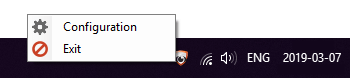
Right-click on the View-it item in the System Tray / Taskbar and then click on the 'Configuration' item.

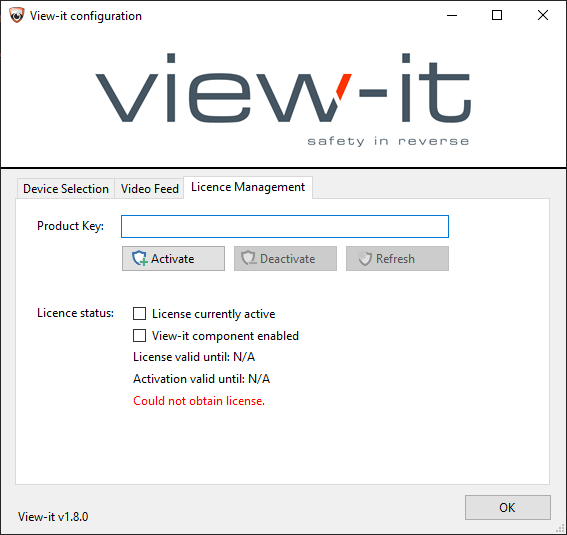
- Navigate to the 'License Management' tab.
-
Enter your product key.
-
Press 'Activate'.
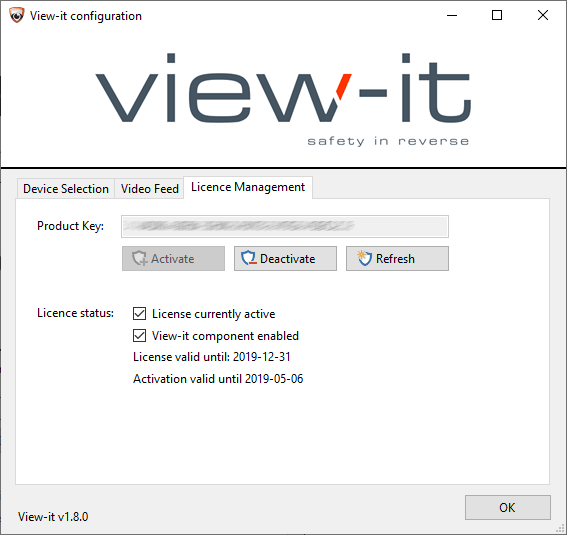
- You should see confirmation that your license activation is valid.
License/Activation expiry
Each license activation has an expiry date. This date is shown in the "activation valid until" label. Each license activation will last for 60 days by default. View-it will automatically attempt to refresh the activation as it comes closer to expiry, but if it is unable to due so (due to firewalls, group policy, etc.) then a manual license reactivation will be required. This can be performed by pressing the 'Refresh' button. Even if the activation is not refreshed, the software will continue working as normal until the 60 day license activation period has elapsed. At this point, the activation will be considered to be expired, and the software will run in restricted mode.
Each license itself also has an expiry date, based on when you purchased View-it. This date is shown in the "license valid until" label. You are required to purchase a license extension if you wish to use View-it after this date.
Restrictions on unlicensed software
Safety is our number one priority. As a result, if a View-it installation ever loses its license activation for any reason (such as lack of internet connectivity, etc.), the View-it software will still work. However, the video feed will be watermarked and the user will see periodic reminders to obtain a valid license.
Licensing troubleshooting
View-it needs an internet connection in order to successfully obtain a license. If you are having trouble getting View-it licensed:
- Ensure that your computer has internet access.
- Ensure that your firewall is not blocking access to https://licensing.blank-it.com/ (opens in a new tab)